FAQs
- What is the firmware changelog on my Fronius Primo GEN24 Inverter?
Some clients ask about their Fronius Primo GEN24 inverter and want to know what the firmware changelog is over time. We have compiled an historical account for our client reference which you can see below.
Please note the firmware changelog is in relation to the following Fronius Primo GEN24 inverters, Fronius Primo GEN24 3.0 - 6.0 and Fronius Primo GEN24 8.0 - 10.0 and more specifically:
Fronius Primo GEN24 3.0, Fronius Primo GEN24 4.0, Fronius Primo GEN24 4.6, Fronius Primo GEN24 5.0, Fronius Primo GEN24 6.0, Fronius Primo GEN24 8.0, Fronius Primo GEN24 10.0
Also included in the firmware changelog are the Fronius Primo GEN24 Plus inverters. These include specifically:
Fronius Primo GEN24 5.0 Plus, Fronius Primo GEN24 6.0 Plus, Fronius Primo GEN24 8.0 Plus, Fronius Primo GEN24 10.0 Plus
Firmware Version
New Features
Bugfixes
Set up changes
1.35.8-1 Implementation of self-consumption activation for System Power Control - excess energy from slave devices will be used now.
Log data upload stabilization - Devices sporadically interrupted the archive data upload
1.34.6-1 Due to a problem during the update process, it could happen that the inverter no longer fed into the grid. CAN Components were no longer recognized.
1.30.7-1
• Improved switching time to Full Backup.
• Fixed issue with LED-UI not representing the correct WPS state.
• Resolved loss of network configuration after changing networks (mesh networks or low signal strength).
• Corrected spacing in the sidebar of the user menu.
• Wrong status codes showing for certain overtemperature events have been corrected.
• Fixed bug with main menu items disappearing after double-clicking.
• Corrected the unit of reactive power of the Smart Meter in the user interface of the inverter from VA to var.
• Corrected a wrong status code reply in the Solar API.
• Changed label from ”Access to Solar.web” to ”Data connection to Fronius” in the setup wizard to avoid confusion.
• Solar.web link within the user interface of the inverter now labeled more clearly.
• After updating to an already installed bundle version, the correct progress will now be shown. The bug with an unknown
update result has been fixed.• Overlapping of the menu in the Russian version of the user interface of the inverter has been fixed.
• Raised feed-in limit from 200 kW to 200 MW.
• Adjustments according to IEEE 1547 regarding Q(U) regulations have been made and new lock-in/out limits for power consumption have been added.
• Created new setups:
◦ Lithuania (LT0A, LT0B).
◦ New Caledonia (NC22 – New Caledonia).
• Adjustment of multiple Brazil setups (BRA2, BRA3, BRA5, BRA6) -> voltage limit trip times.
• Changed multiple setups to allow for frequency and voltage-dependent functions to be performed even if an external power limit is set.
1.28.7-1
• Adaptation of the internet configuration to comply with GDPR.
• Verification of conformity to the feed-in limitation requirements stipulated by ESB Networks in Ireland (according to Form
NC7).• Implementation of remote charging and discharging for the battery in accordance with the IEEE 2030.5 for Australia.
• New State Code 1297 (controlled disconnection from the grid after an attempted Voltage Fault Ride Through)
• Fixed update and rollback problem where an ”unknown” software version is displayed.
• External device events (service messages) are reported to Solar.web in FLD again.
• Ramp rate after I/O power limitation is now applied correctly.
• Recovery time after LVRT now complies with the CEI 0-21 standard.
• Resolved a display error with the country setup in the ”Information” menu.
• Fixed conversion problem with current transformer ratios for the Fronius Smart Meter 50kA-3.
• Internet service tests - Name resolution tests are giving correct results now.
• Optimised processor utilisation.
• Corrected irradiance dependent AC-Powerramp gradients.
• Fixed too frequent insulation measurements during backup power mode.
• Modified Terms and Conditions in the ”Setup” menu of the setup wizard.
• The ”Next” button in the setup wizard is now only clickable when the current steps content has loaded.
• Fixed incorrect sending of error message 1294 (Internet Services Connection Verification Failed).
• Partial fix of the Solar.web connection and communication issues. The following problems were fixed:
◦ If the WPS was triggered too frequently, the network configuration could be lost.
◦ Obtaining an IP address via DHCP did not always work.
◦ Real-time data was not sent, but archive data was.
◦ Real-time data was sent, but no archive data.
• Adaption of the EU setups (EULV, EUMV, EULVB , EUMVB) according to EN50549-1/-2.
• Merged the setups CZ and CZMV including a value adjustment.
1.27.3-1
• Advanced Network Reporting - Improvements of the user interface and implementation of a new state code 1294
◦ New state code 1294 - Internet services connection verification failed - See internet services in communcations menu for
details.• Reconnection behavior after an AFCI trip improved.
• State 1058 - Adjustment of the tripping frequency
• Fixed the display error on the website of the inverter - There were no power bars in the bubble chart and the utilization was displayed as 0 % .
• Validation for device replacement could not be carried out properly.
• An error in the FAC reconnection of the inverter has been fixed.
• State 1177 (”Too many inverter shutdowns in backup power mode”) - False tripping after only one shutdown has been fixed.
• State 1196 (Inverter required setup values could not be received) False tripping after an update due to a timeout has been fixed.
• Power fluctuation tolerance too high.
• PV Point - Battery ”SOC warning level” & ”Reserve Capacity” fields have been disabled in case no battery is connected.
• Correction of the misbehavior of the battery: In backup power mode, when the battery reached 0 % charge, it sent the command for forced re-charging and remained active.
• I/O Power Management Rule Export was saved with the wrong file extension.
• The Modbus register ”Conn” was deactivated again if the SunSpec mode was changed within 15 s after activation.
• Bug fixed which caused after update to 1.27.2-1 that the inverter did not send data to Solar.web and the battery did not operate correctly
• State Code1294 could not be confirmed by user.
• Adjustments GVDPR for setups: IT6, IT6B, IT7, IT7B (GEN24/Tauro).
• AFCI parameter adjustments for GEN24 setups.
• Setup adjustments ZA2 (> 100 kVA) - FRT Region 1 & 2, Current Calc Mode.
1.25.3-1
• Improvement of Arc Fault Circuit Interrupter.
1.25.2-1
• In case of a device exchange, it is no longer possible to enter the same serial number for the defective device and for the exchange device.
• Advanced network reporting improved. The network configuration and behavior is monitored permanently.
• Earth fault or short circuit detected during PV Point or Full Backup operation. Confirmation of event 1290 needed.
• EN50549-10 FRT at sites with battery power settling time after fault has been changed to the required time of 1 s.
• Password policy is shown for technician & customer in case of a password change.
• Improvement of the stability of the ”system health monitor process”.
• In case of a broken CT (current transformer) cable, the inverter will recognize it within the required time of 5 s to meet the G100 standard and the system is put into a fail-safe mode.
• At the country setup settings the region 50 Hz is visible again
• Stability of data logging and transmission has been improved.
• False tripping of AFCI caused by configuration changes has been fixed.
• Internet Service Tests: translation of subprocesses in German has been added.
• A display error of the energy flow in the Bubble Chart during PV Point operation has been fixed.
• Display of wrong power values in the bubble chart has been fixed.
• Missing live data in case of using secondary meter has been fixed.
• Setting of nominal voltage in PV Point mode is possible.
• Fix for display error of component list on the user interface of the GEN24 inverter, Ohmpilot was not displayed anymore.
• Visualization of the state bar on the user interface of the inverter has been fixed (factory settings).
• Fixed the possibility of wrong configuration of Full Backup mode without battery.
• Improvement of the stability fot MPP tracking at low power.
• When resetting to factory settings (customer reset), the settings in the energy/battery management are now also deleted.
• Fix of the display error on the user interface of the inverter, error messages were displayed at device state and were no longer deleted.
• Bugfix against freezing of the user interface of the inverter after connecting to a Wi-Fi via Solar.start app.
• In case of high earth impedance, the inverter trips with state 1082 caused by a negative isolation voltage (sets iso resistance to zero).
• Adjustment of GFDPR underfrequency start frequency from 48.8 Hz to 45 Hz.
• Setup adjustment of EULV & EUMV & EULVB & EUMVB due to EN50549 (FRT parameter adjustments).
1.24.6-1
• Advanced network reporting implemented. The network configuration and behavior shall be monitored permanently.
◦ There is a new page in the communication section of the user interface of the inverter called Internet Services. In case of network problems, this page should be opened to get more information.
• Tripping characteristic of event 1116 (transient AC voltage exceeds AC voltage limit at the inverter) was improved.
• Wrong power factor sign on Smart Meter WR if active power register is positive and reactive power register is negative.
• Wrong primary interface on the user interface of the inverter in case of changing the connection from LAN to WLAN.
• Italy standard (CEI 0-21) criticized the use of a wrong power gradient for charging and discharging batteries.
• State 1055 false trippings fixed.
• Tripping characteristic of event 1180 (transient AC voltage exceeds AC voltage limit at the inverter during backup mode) was improved.
• Tripping characteristic of event 1089 (system failure) was improved in case of permanent state 1199 (PECapacitiesTooHighForFeedIn).
• After a successful reconnection between the Solar.start App and the inverter, a connection error was still displayed in some cases.
• Restart event for Solar.start app was triggered after the reboot of the inverter and not before.
• Wattpilot was partially displayed offline in Solar.web.
• No connection with secondary TCP Smart Meter if a RTU smart meter was connected as primary meter.
• The return to the original power after an FRT event took too long (according to the Italian standard CEI0-21).
• Tripping characteristic of event 1074 (insulation measurement failure - invalid booster state) in case of start-up phase in the morning/evening was improved.
• Active power settings for the DNO rules (I/O Power Management) were not displayed correctly on the user interface of the inverter.
• Network configuration was sporadically lost. A device restart or reconfiguration of the network configuration was necessary.
• The access point was automatically closed after approx. 1 minute after the WLAN configuration was performed.
• Ohmpilot control did not work correctly with export limitation, high DC link voltage and battery.
• State 1197 false trippings fixed.
• Italy country setups were adjusted.
◦ Setup adjustment static threshold IT7 - FRT Region 1 Static Threshold from 120 % to 115 % .
◦ Setup adjustment static threshold IT7B - FRT Region 1 Static Threshold from 120 % to 115 % .
◦ Adjustment of softstart gradient from 0.3 % to 0.143 % IT6B and IT7B.
• Setup adjustment CHA, CHAQ and CHB - Change GFDPR parameters
• New setup for Switzerland CHA(Q)
• Change of FRT parameters for setups BE, DKA1, DKA2
• Adjustment of the CosPhi parameter for France setup FRLV
• Adjustment of P(f) Mode for G98/NI & G99/NI setups
• New EU battery setups - EUMVB & EULVB
1.23.5-1
• Dynamic Peak Manager scan adaption
• Implemented compatibility for module level shutdown devices.
1.23.3-1
• Improvement of AFCI performance to meet the KPI of false trippings
• EN 50549-10 Implementation - Main testing standard for grid connection in Europe
• Backup power switchover time improved (~30 s)
• Preventing incorrect network configuration on LAN2
◦ New state code 1132 in case of an active connection on reserved LAN2 port
• Support of LG Chem RESU FLEX battery
• Integration of the new ”General Data Protection Regulation”
◦ New selection options for the Terms and Conditions available. If the Terms and Conditions are agreed to, the necessary
technical data will also be processed.• Bug fix against unwanted state 1074 trippings in case of DC_Link_Voltage higher than 537 VDC
• Secondary Smart Meters were partially displayed as offline in the component view on the user interface of the inverter.
• Smart Meter state and measured values not updated when connected to RTU1
• Bugfix against unwanted state 1197 trippings during inverter start up phase
• Bug fix against unwanted state 1055 trippings
• Solar.web wizard is displayed as completed (green tick) but the information text still says ”Not configured”
• Improvements during commissioning with Solar.start app
◦ Automatic reconnection in case of a device restart
• Wrong channel name in frequency-dependent power reduction menu - Stop frequency overvoltage instead of stop frequency overfrequency was used.
• Wattpilot was partially displayed offline in Solar.web
• It was possible to activate the ”Reduce inverter power to 0 % if Smart Meter connection has been lost” feature although the feed-in limitation feature was deactivated
• Load management output sometimes remains active for no reason
• Delete confusing message in Modbus setting page on the user interface of the inverter on RTU interface 0: ”Interface is used for communicating with the Fronius Smart Meter.”
• New mode (Sudden Voltage Change Detection) for Voltage Fault Ride Through in the setup menu has been added.
• Activation of Grid-Voltage-Depend-Power-Reduction (GVDPR) for IT6(B) and IT7(B) Setups
• New setups for Brasil caused by newly introduced INMETRO standard
◦ Setup BRA2 for 220 V / <6 KW (Primo only)
◦ SetupBRA3for220V/>6KW
◦ Setup BRA5 for 240 V / < 6 KW (Primo only)
◦ SetupBRA6for240V/>6KW
• Setup CH was removed and setups CHA and CHB were adjusted.
◦ Voltage Outer Limit Min (Trip Time) = 0.3s
◦ Long-term Voltage Limit Max (Trip Time) = 0.1vs
1.22.3-1
• Security issue - Vulnerability in Linux kernel fixed.
1.22.2-1
• Support integration of BYD Premium HVC.
• EVU editor - If a 100% rule is activated, there is no more PowerReductionCommandActive (1003).
• Implementation of dynamic customer connection for DER in Australia according to IEEE 2030.5.
• Adjustment performed on isolation measurement during the night to avoid State 1164 false tripping.
• Solar API - Secondary smart meters are now supported.
• TCP Smart Meter support in the configuration on the user interface of the inverter.
• Display of the MAC address on the user interface of the inverter in the network overview incl. a display whether WLAN or LAN is the active connection.
•
• State 1084 False triggers fixed in backup power mode for country setups with RoCoF mode enabled.
• Fixed the problem that the DHCP lease on the device was no longer renewed. Device was then permanently offline and could no longer be found in the home network.
• No State 1072 (IsoNightModeFaultOverCurrent) if DC power will be activated during isolation measurement.
• No more State 1197 trips every 5 minutes when DC disconnector was off.
• No multiple state 1074 IsoNightModeFaultInvalidBoosterState in case of a state 1072 IsoNightModeFaultOverCurrent.
• No persistent state 1199 PECapacitiesTooHighForFeedIn if inverter detects too high capacity just once.
• Export Limit - Power reduction to 0% was too slow (> 5s).
• User interface of the inverter - set language has partially changed when page was reloaded.
• Partially, the MPP tracker no longer works on the device (MPP voltage was about 30 V).
• Fast undervoltage safety cut-out in backup power mode took too long.
• Fixed false triggering of State 1196 after software update.
• Fixed sporadic false triggering State 1139.
• In case of too high DC voltage, too many State 1138 trips were logged.
• Partially the wrong Solar.web connection status was reflected on the user interface of the inverter.
• Deactivation of Anti-Islanding Mode for all Denmark DK setups.
• Changing the reconnection limits for EU LV and EU MV setups.
• Adaptation of GVDPR stop undervoltage for AUB.
1.21.7-1
• Fronius Smart Meter WR (Wide Range) did not work.
1.21.6-1
• The display level of various state codes has been changed so that only relevant state codes are displayed to customers.
• In the Solar.start app it is now possible to download the system information page as a PDF.
• In the Solar.start app, the user is informed when the inverter restarts by an update or by resetting to factory settings.
• The local time is now used for functionalities such as Load Management, Battery Management, Ohmpilot etc.
• New setup parameters for fast under-voltage shutdown in backup power mode - earth fault protective shutdown.
◦ Fast undervoltage / earth fault protection time.
◦ Fast undervoltage / earth fault protection voltage limit.
• Change the fire hazard current monitoring (cont. Change) TAURO & GEN24 (IEC63112) [CPP].
◦ New setup parameter in the user interface of the inverter - Continuous residual current limit.
◦ Change reference value from AC power to connected DC power.
• Implementation of a notification in the Solar.start app in case of an inverter network change.
• New function to enable remote control via the cloud.
• New functions implemented according to IEEE 2030.5 standard.
• The ”System Information” PDF also includes the content of ”System Information” and ”Safety and Grid Regulations” without login.
• Integration of the new WattNode Modbus WND-WR-MB 100-600V to the Pilot.
• New menu fpr batterymanagement fuctionality (time of use)
• Solar API - Battery Mode and SOC Limit are reported back when battery is configured but not available.
• Infotext for the duration of remote access now matches the actual duration.
• Solar API - Smart Meter position is output when Smart Meter is no longer connected/configured.
• In the system information page at Active Power, there was an error in the name for the activation and reset delay.
• Access Point error message was displayed unformatted on the user interface of the inverter.
• On the system information page at Voltage Fault Ride Through, there was an error in the designation for Reactive Current Limit Over- and Under-excited.
• With activated dynamic power reduction in combination with high load jumps in self-consumption, battery control problems could occur.
• Inverter did not shut down within the set backup power voltage limit.
• If the event code ”power low for backup operation” (1125) was triggered by a backup undervoltage protection limit, the event could not be confirmed manually by the user.
• Sometimes it could happen that two states occured at the same time (1125 and 1177) in backup mode after an overload event.
• Smart meter AC current values missing in the advanced view of the user interface of the inverter.
• Voltage values of Smart Meter were not updated regularly in the advanced tab of the user interface of the inverter.
• Adjustments in the Solar.web connection for better stability.
• Using reactive power mode in country setup together with cos phi over Modbus API could cause the device to shut down.
• Isolation measurement scheduler does'nt work in case of configured full backup mode.
• Limited production with setup CH (CosPhi_Over_P).
• No interlocking mechanism for backup under- and overvoltage protection and bad error handling in case of wrong settings.
• Setup adjustment Hungary HU - Various voltage and frequency limits have been adjusted due to normative requirements
• Setup change GB G98 and G99:
◦ New setup ”Great Britain G99 Type B” (Tauro).
◦ Change of display name for the existing ”GB-G99” setup from ”GB-G99 - Great Britain G99” to ”Great Britain G99 Type A”.
◦ Change of display name for the existing ”GB-G98” setup from ”GB-G98 - Great Britain G98” to ”Great Britain G98”.
• Setup change Ireland IE - Various voltage and frequency limits have been adjusted (based on DTIS-230206-BRL version 6.1).
• NI G99 setups changed:
◦ New country setup ”Northern Ireland G99 Type B” based on EN50549-2.
◦ Change of the display name for the existing ”G99NI” setup from ”G99NI - Northern Ireland G99” (Tauros) or ”Northern Ireland G99” (Primo GEN24) to ”Northern Ireland G99 Type A”.
• Replaced the old Australia setups AU1-AU5 with AUA and AU6 with AUB and AU7 with AUC.
1.19.102-1
• New Battery LG RESU FLEX is supported.
• Attention: A factory reset must not be performed! If a factory reset has been triggered, please contact the Fronius Technical Support team
1.19.7-1
• Support for new data communication board hardware.
• Problems with the energy management control in combination with battery
• Ohmpilot and soft limit fixed
1.19.2-1
• The isolation measurement will be done during the night, preferably before the 24 h timout is exceeded
◦ From now on, a 12 h counter is counted up after the last isolation measurement and then the DC power is checked: If the DC power is below a certain value (100 W) & the inverter is not in backup mode & the battery is configured, then the isolation measurement is triggered with State 1001 after another 6 h. This 6 h window was implemented to shift the measurement from day to night.
• Remote Access Change - Increase timeout from currently 3 days to 2 weeks.
• State 1139 false tripping corrected in case of inverter connection with battery.
• Stability of Solar API has been improved. (OutOfMemory).
• Solar API reported battery data although no battery was configured.
• Up to now, the inverter had to be restarted after a device certificate update.
• State 1197 was triggered every ~7 min. if no PV was connected yet or the DC disconnector was switched off.
• After every restart, a ”DeviceIdNotLicensed = code 1146” occurs and sometimes the Pilot exchange page and/or requesting Servicestate failed appears.
• Inverter set Ohmpilot time zone to zero during pairing.
• BugFix inverter hangs with Powerlow when no pv-config is set before the inverter has done the first power check
• Adaption Spain setups for RfG Spain ESA & ESB.
◦ Increase of FRT limit (type A and B, ES_A and ES_B)
◦ Deactivation of anti-islanding only for type B (ES_B).
◦ Deactivation of the tolerances for voltage and frequency switch-off values for Spain.
◦ GFDPR Active Grid Support from currently ”0” to ”1”.
• Display name of the setups DKA1 and DKA2 adapted.
◦ DKA2 - East Denmark <=125 kW ==> DKA2 - East Denmark LV
◦ DKA1 - West Denmark <=125 kW ==> DKA1 - West Denmark LV
• Setup adaption Australia and New Zealand according to AS4777.2:2020
◦ Ramprate power up Mode to ”1”.
• Setup adaption Finland.
◦ Modification of various parameters to comply with standard EN 50549-1.
• Modification of the under- and overvoltage limits for backup power settings to prevent incorrect configuration.
1.17.2-1
• The ”Restore factory settings” menu has been revised. There is a customer and a technician reset now. Additionally the network settings and the log data can be reset.
◦ Customer Reset: The general and power management settings are reset.
◦ Technician Reset: The general settings, power management, device configuration, security and network control are reset.
(Normative settings from the country settings are not affected by the factory reset).• Change behavior in case of emergency power overload. There is now a separate state code (1125) for ”Power too low in emergency power mode”. Previously, the general error 1175 ”Power too low” was triggered. The reconnection time in case of a state 1125 occurrence is 20 minutes now. This avoids the occurrence of a State 1177. (Too many inverter shutdowns in emergency power mode - confirmation required).
• Setups Thailand TH MEA and TH PEA have been added
• State 1197 is no longer triggered every 7 minutes in case of a switched-off DC disconnector and the device is supplied with AC.
• Triggering characteristics for State 1036 adjusted.
• Error in the commissioning wizard has been fixed. Sometimes the website of the inverter froze after clicking on the ”Next” button at export limitation.
• Mains frequency is displayed again on the website of the inverter in the advanced view.
• Special characters are now also supported for the Customer and Technician passwords and do not cause problems anymore when navigating the website of the inverter
• The I/O settings were not reset until now when ”Restore factory settings” was executed. With the new function (see above) this is now guaranteed.
1.14.110-1
• Solar API can now be set to Off/On at the website of the inverter in the menu item ”Communication”. Default = Off
• Russian language available at the website of the inverter
• Hard and Soft Limit function on the website of the inverter under menu item “Dynamic Power Reduction” adjustable for Australian Standard AS4777.2.
◦ Hard Limit = If set limit is exceeded the inverter will shut down.
◦ Soft Limit = The set limit has to be reached within 5s.
• Automatic certificate extension implemented when devices are online
• DC disconnector switch-off detection implemented to solve the following issues:
◦ Partially the inverter did not switch off immediately when the DC disconnector was switched off if only the battery stage was in operation.
◦ Avoidance of high reconnection currents when DC disconnector is switched on/off briefly during active charging/discharging processes.
◦ Avoiding inverter start-up processes when only AC is supplied and the DC disconnector is still switched off.
• Elimination of false triggering of State 1139 (DC link voltage too low) for PV systems with battery only (without PV).
• Display error for export limit corrected
• State 1072 (overcurrent during insulation measurement) tripping behaviour changed in case of error – Previously in case of an error an event was triggered every second.
• Solar Start App: The ”Back” button was not displayed in the licence exchange menu. Now fixed.
• Problems with Solar API function in case of battery or smart meter replacement have been fixed.
• Designation of the channel “Total apparent power” on the website of the inverter under the ”Advanced” view has been
corrected. Before the text ”Total reactive power” was displayed here.• In the country setup selection the available setup are now in alphabetical order
• In the SoC Limit Mode ”Auto”, the Min and Max limits could still be adjusted.
• False triggering of state 1193 (=the output power of the inverter was not configured) fixed. Sometimes the inverter output was also limited to 500W after a software update or after an AC/DC reset.
• BugFix in the load management menu: Target runtime can now be added.
• New country setups for Northern Ireland G98NI/G99NI added
• New country setups for Germany regarding manufacturer ”Sonnen” DE3F, DE3P, DE4F, DE4P, DE4U
• Setup change for Spain ESA and ESB
◦ P(f): Activate P(f) without hysteresis; enablelimit for underfrequency 49.8Hz with disablelimit 49.8Hz with derating gradient 40% /Hz;
◦ Q(U): Default values have been set, mode not activated; set change time constant to 0.3s
◦ set ”Ignore manual power reduction” to 1
◦ P(f) Adjust underfrequency reference value from current ”0” to ”2“
• Setup change at Cyprus Setup CY
◦ Set RPM cos Phi(P) X4 from current 90 000 m% to 100 000m%
1.13.13-1
• Phase accurate feed-in limitation (weakest phase approach) can be set as a separate mode under “Export Limitation”
• Solar API adjustments according to API documentation
• Remote control via Solar Web implemented. In the Web UI under Communication you can now activate the remote control via Solar Web. This feature gives utilities the possibility to change the feed-in limitation of the inverter (currently only used in Australia).
• New error codes for hardware defect in the AC bridge circuit. State 1065 for L1, 1066 for L2 and 1068 for L3 have been added.
• DC sum current limitation to increase lifetime at certain operating points. (Low DC voltage on PV1, PV2 and BAT - High DC current, high temperatures).
◦ I_sum= I_PV1+ I_PV2+ I_BAT / 1pNext 6kW: I_sum= 39A
◦ 1pNext 10kW: I_sum= 46A
◦ 3pNext 5kW: I_sum= 30A
◦ 3pNext 10kW: I_sum= 50A
• Neutral wire break detection in emergency power has been fixed. So far no detection in case of error from the device.
• No battery management if the battery is switched off manually for >10min. during operation and then switched on again. Battery then started up in energy saving mode. So far only an AC/DC reset helped here.
• CAN Bus false triggers (=State 1020 & State 1022) fixed.
• Modbus API via TCP did not work with replacement devices
• Load management function - Automatic correction for the ”Power surplus” function after a software update to 1.13.9. Depending on the software version, the Consumption and Feed-in parameters were exactly inverted. (Both on the Web UI and
with Modbus/API commands). With the update this is automatically corrected.• Avoid FI trips when BYD battery is switched off.
• Wrong error code in case of overload in emergency power. Previously, sometimes only a power too low error was displayed instead of overload error.
• State 1143 BugFix. False triggers fixed
• Cloud Handling BugFix: Devices reconnect automatically to Solar Web after a connection loss.
• Australia setup change AUS1 - AUS7 due to AS 4777.2
• New Setup ZA1 for South Africa
• New setup IE added
• Setup EE added (Estonia)
• New Setups AUA, AUB and AUC for Australia & Setup NZ1 for New Zealand
• Setup portugal added
1.12.5-0
• BYD battery can no longer be switched into energy saving mode when backup power is active
• Cable break detection on enable line for BYD memory implemented. State 1047 implemented
• Phase Balance Protection implemented for new Australian standard (AS/NZS 4777.1)
• False triggering of CAN bus errors fixed - State 1020 & State 1022
• EVU feedback contact generates an event only once when a rule becomes active
• Load management function has been revised. After update to 1.12.5 the settings should definitely be checked again. Several issues have been fixed here
• No error message was shown if Smart Meter has been added without required settings.
• WIFI configuration is no longer deleted if the WPS function has been activated unintentionally
• Battery current was inverted when requested via Solar API
• There are no more error messages which are displayed as ”Unknown” on the web interface
• Adjustments in Modbus API:
◦ Wrong unit for produced power (Wh were Ws)
◦ Instead of purely produced power, the consumed power was also included
• Inverter fed in although battery was connected in reverse polarity
• AC voltages are now displayed on the web interface under ”Advanced” even if the inverter is not feeding in
• PV Point did not work when reserve capacity was set
• State 1168 (IDC Sensor Offset) will be triggered less often in case of reverse polarity of the PV inputs
• When zero feed in was activated, a mains draw of 80W was permanently displayed
• Correction of AC voltage and frequency errors during battery start-up
• SOC warning is now displayed when emergency power is activated and the value is undercut
• Incorrect energy counter on the web interface has been removed
• State 1115 (AC overvoltage) will be triggered less often when AC voltage is too high
• Australia Setups - Power Ramp Rate setting has been deactivated
• Chile Setup added
• Microgrid Setup MG60 added
• Norway Setup added
• Sri Lanka Setup added
• Romania Setup added
• Poland Setup added
• Greece Setup added
- How to Update Fronius SnapINverter Datamanager and Firmware
For your Fronius SnapINverter (Fronius Primo / Symo) - here we recommend having the most up to date firmware so you get the best out of your rooftop solar PV system with your Fronius SnapINverter.
We recommend setting up regular Calendar reminders to review the current system firmware settings - a recommended interval for checking is annually every 12 months.
IMPORTANT: Ensure the Datamanger is updated BEFORE the Firmware is updated. Detail below:
1. Log into Fronius Solar.web (www.solarweb.com)
2. Select your solar PV system
3. Click on the Settings tab
4. Click on the Components tab
5. Begin the update process for the Fronius Datamanager. Select the Data Source and click UPDATE (Important! Wait until this is complete before proceeding to the next step)
6. Updating the Fronius SnapINverter firmware by selecting the Inverter and click UPDATE (Note this process can take up to 20-60 minutes for this process to complete.)
- Why does the Tesla mobile app show power flows or values that appear inaccurate?
Power flow on the monitoring Tesla mobile app shows the instantaneous flow of power of your home energy system. On a typical day a combination of solar, grid, and Powerwall may be powering your home. Solar energy may flow to the grid when your home does not need it and Powerwall is full. When charging your Powerwall to its backup reserve level or in Backup-only mode, solar power will flow directly from solar to Powerwall while grid energy is drawn for the home.
- Where can I find my Powerwall Gateway information?
The Tesla Gateway part number and serial number for your Powerwall Gateway will appear on a sticker on the inside of the Gateway door. Learn how to locate your Gateway information here.
- Tesla mobile app - log in / set up / learn more
Once your Powerwall has been turned on, download the Tesla app and start monitoring your Powerwall and home energy usage.
Step 1: Log In
Log in using the same email address you used to order Powerwall with solar. If you are already a Tesla vehicle owner, log in using the same email address you use to sign into your Tesla Account.Step 2: Set Up Notifications
Receive notifications when Powerwall starts backing up your home during instances such as a power outage.Step 3: You are now logged into the Tesla app
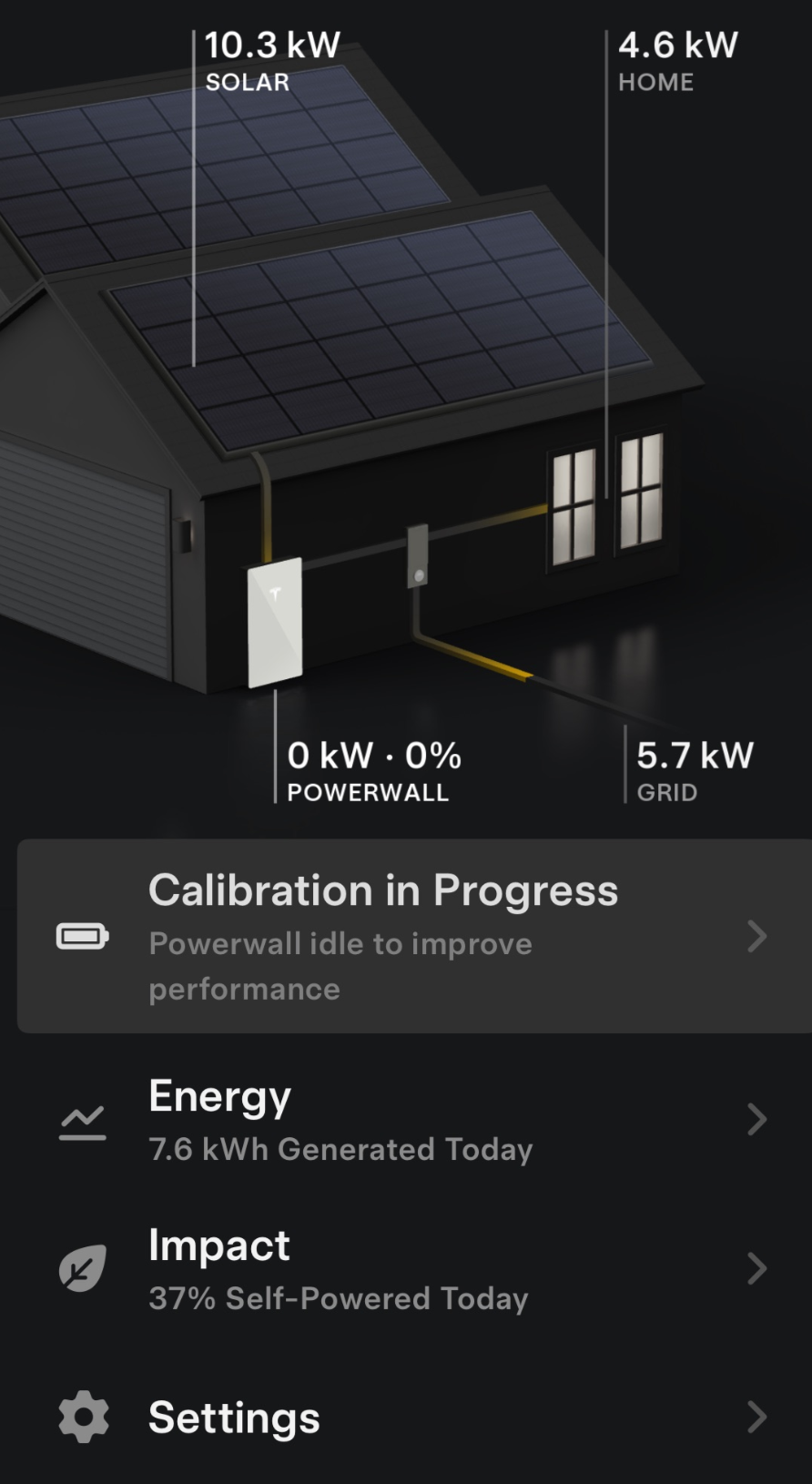
Learn more about the features of the Tesla mobile app. You can also learn more about using and customizing your Powerwall below: - Tesla Powerwall 3 Calibration in Progress
You have a Tesla Powerwall 3 and you receive the message in the Tesla app saying, "Calibration in Progress". This appears an App Alert Banner saying, "Powerwall (charging, discharging, idle) to improve performance".
This is normal and within Tesla's technical specification for the Powerwall 3. As the battery chemistry has changed from Powerwall 2 to Powerwall 3 (LFP) - Tesla will initially require this to be done in the early stages of the rollout with the expectation for the need to calibrate to reduce over time.
Tesla advise the Powerwall 3 must periodically undergo routine calibration for optimal battery performance. Some things to note during this calibration include:
- Calibration may take up to 24 hours
- Powerwall may discharge past your backup reserve
- Powerwall may not charge from solar
- Powerwall is still ready to back up your home during grid outages
Below is an example how the message is displayed in the app.
- Why isn't my Powerwall charging?
When installed with PV, Powerwall is designed to charge from solar energy. If your solar system is not yet operational, Powerwall will not be able to charge. If your solar system is operational and you are in Self-powered Mode, Powerwall will charge with any excess solar that your home doesn't immediately use. Smaller solar systems sometimes do not produce more than your home is currently using. You can increase the backup reserve or switch to Backup-only, which will prioritize charging Powerwall with any solar production.
- What is the lowest pressure the Methven Kiri Satinjet ultra low flow shower head can operate at?
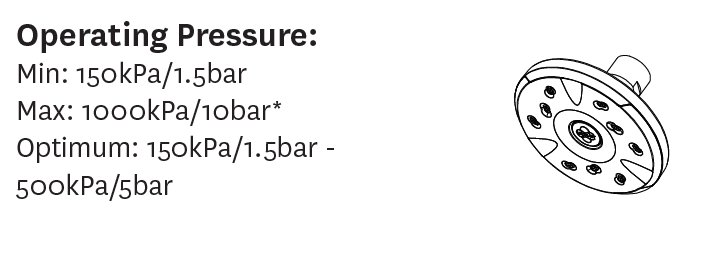
The optimum operating pressure for the Methven Kiri Satinjet is 500kPa / 5bar. However the showerhead can operate as low as 150kPa / 1.5bar. Giving you plenty of flexibility.
- Can I swap out my old showerhead for the Methven Kiri Satinjet Low Flow Showerhead?
Can I swap out my old showerhead for the Methven Kiri Satinjet Low Flow Showerhead?
In most instances yes absolutely. The Methven 5.0L/min 5 Star Kiri Satinjet Low Flow showerhead comes with a half-inch 1/2" BSP connection which is very common amongst showerheads making swap-outs very easy.
A test to confirm if you can swap out a standard rose or not from an existing shower arm is if you can twist it off yourself.
If you can't twist the head/'rose' that probably indicates the existing shower rose is integrated into the arm.
In this instance you need the Rose plus arm (either modern arm, capstan or dual pivot arm).
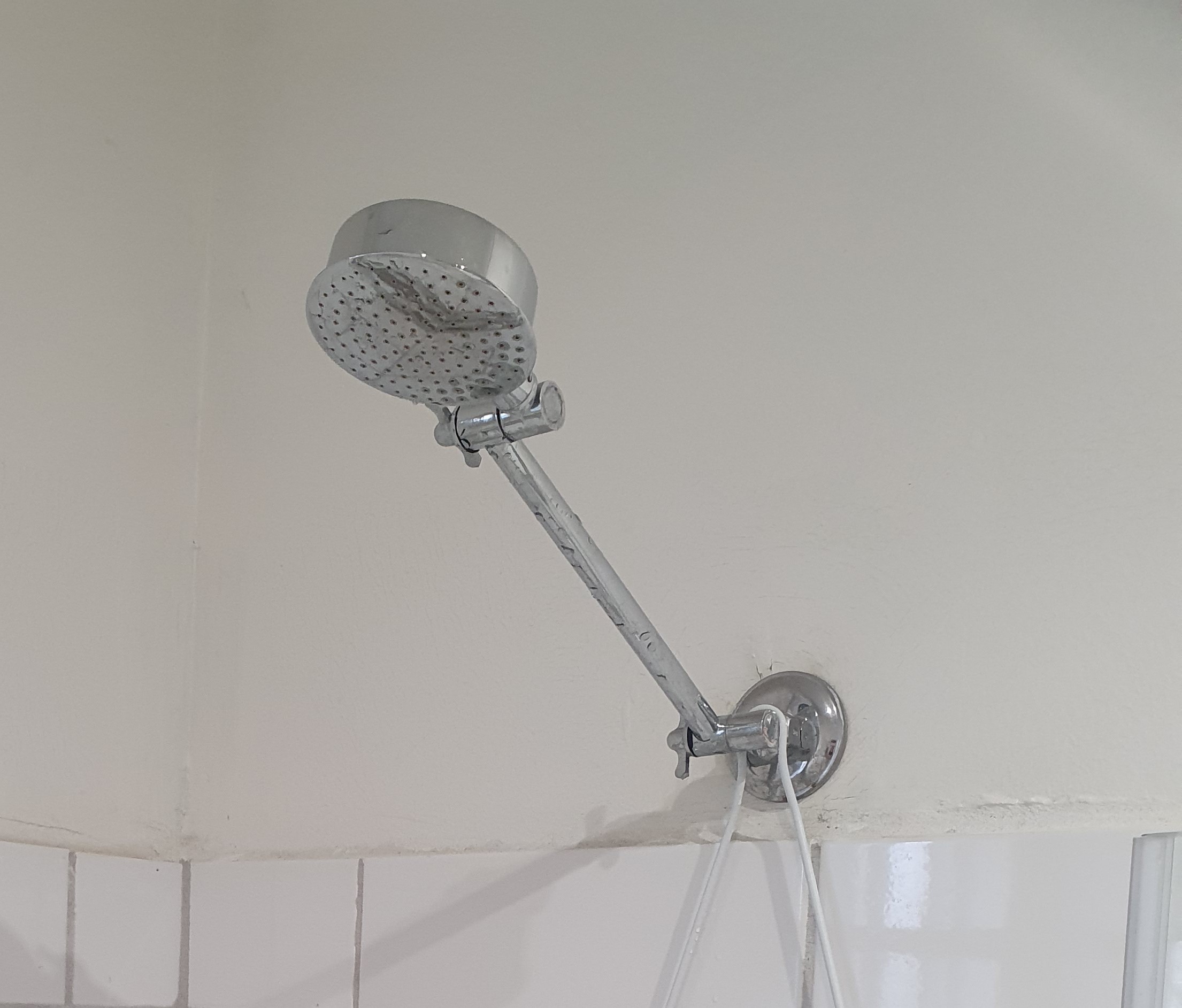
See below an example of an old very inefficient 15-25 L/min integrated showerhead that would need a new Rose plus arm (unscrew the entire arm off the wall). The Methven 5.0L/min 5 Star Kiri Satinjet Low Flow uses between 3-5x less water than those shower heads in the picture below, a huge water and energy saving opportunity.
You can choose any of our Methven 5.0L/min 5 star Kiri Satinjet Low Flow showerhead options from our website.
- What are the benefits of the Methven Kiri Satinjet ultra low flow shower head?
Benefits of the Methven Kiri Satinjet Ultra Low Flow:
- Full-body shower experience: Exclusive to Methven. Satinjets colliding twin jets produce over 300,000 droplets of water per second for the ultimate shower experience.
- Methven revitalises the traditional shower: The traditional shower experience, enhanced by leading-edge Methven technology.
- Easy DIY installation: Replace your shower rose on your own - no need for a plumber
- Low Flow technology: The revolutionary Kiri Low Flow range provides a great shower at a flow rate of just less than 5.0 litres per minute
In summary if you want maximum shower for minimum water usage then the Methven Kiri Satinjet ULF is the answer.
Feel free to check out our Methven Kiri Satinjet Ultra Low Flow showerhead webpage for more information and this video below to see the Methven in action:
- Full-body shower experience: Exclusive to Methven. Satinjets colliding twin jets produce over 300,000 droplets of water per second for the ultimate shower experience.